Building an In-Memory Filesystem Driver from Scratch
A file system is what allows us to organize files and directories into hierarchical trees. But how is this actually implemented in Linux?
Following Feynman's famous quote, we are going to build our own in-memory filesystem driver to understand it. This guide focuses on the practical aspects necessary to get such a filesystem up and running. For a deeper dive, check out the references and the Further Reading section at the end.
You can find the source code in this repo.
How Do Users Interact with Filesystems?
Your first thought can be: "Through applications, the shell, or tools like ls and vim." That's true but let's go one level deeper, and you'll find system calls.
Whenever a userspace program performs an I/O operation — opening a file, reading data, or writing to disk — it issues a system call such as open, read, or write. These syscalls are the entry points into the kernel.
But how does the kernel handle them? How does it know where in memory to write the data, how to create or delete files, or which filesystem should respond?
We're not going to cover syscall mechanics in this post (you can find excellent explanations here), but we'll explore what happens after a syscall hits the kernel — specifically how the Virtual Filesystem (VFS) bridges this gap.
The Virtual Filesystem (VFS)
The Virtual Filesystem is a component of the kernel that handles all system calls related to files and file systems. Think of it as a universal adapter which allows multiple filesystems (ext4, tmpfs, NFS, your custom driver) to coexist and plug into the same syscall interface. VFS takes care of most of the complex and error-prone parts, like caching, buffer management, and pathname resolution, but delegates the actual storage and retrieval to your specific filesystem driver.
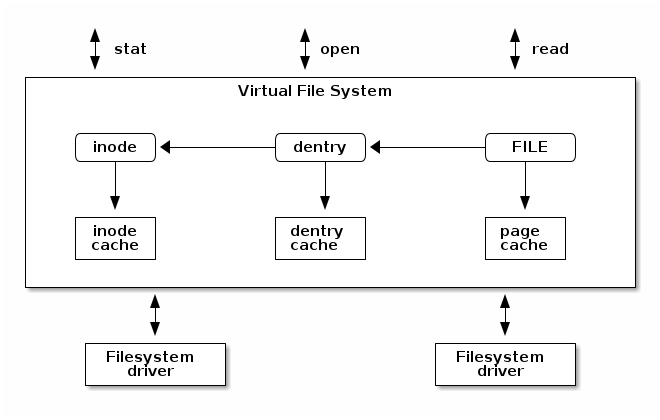
High-level overview of how VFS works.
How Does the VFS Interface Look?
Let's work from first principles. If you were designing a filesystem interface, you'd want to define:
- Metadata about the filesystem itself: its name, block size, max filename length, etc.
- Operations on the filesystem: how to mount it, unmount it, query statistics, etc.
That's exactly what Linux does using a structure called file_system_type.
file_system_type: Registering a Filesystem
This structure represents a specific type of filesystem (e.g. ext4, tmpfs, or myramfs) and provides the logic for mounting and unmounting it:
struct file_system_type {
    const char *name;
    struct dentry *(*mount)(struct file_system_type *, int, const char *, void *);
    void (*kill_sb)(struct super_block *);
    struct module *owner;
    // ...
};
When your driver is loaded, you register this structure with the kernel using register_filesystem.
Superblock: Mounting a Filesystem
Once a filesystem is registered, how does it get used? The answer is: via mounting.
Every mounted instance of a filesystem is represented by a super_block structure, which tracks its root directory, all its inodes, and any internal metadata:
struct super_block {
    struct list_head s_inodes;       // All inodes in this mount
    struct dentry *s_root;           // Root directory entry
    struct file_system_type *s_type; // Back-pointer to FS driver
    unsigned long s_blocksize;
    unsigned long s_magic;
    const struct super_operations *s_op;
    void *s_fs_info;                 // FS-specific data
    // ...
};
The superblock essentially answers: "What does this filesystem look like once mounted?"
Inode: Representing Files and Directories
Next, we need a way to represent individual files or directories. In Linux, they're both handled using a structure called an inode.
An inode holds metadata like size, permissions, timestamps, and pointers to file content. But importantly — it does not store the filename.
Why not? Because the same inode can have multiple names (hard links), and we don't want to duplicate the actual file or its metadata. The filename is managed separately, using a dentry.
Linux kernel implementation of inode is here.
Dentry: Directory Entry
A dentry (directory entry) maps a filename to its corresponding inode. You can think of it as the glue between filenames and the actual file content.
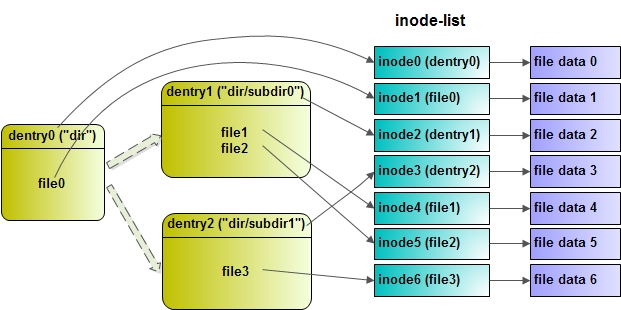
Illustration of how dentries map to inodes.
Multiple dentries can point to the same inode (e.g., via ln file linkname), enabling hard links without data duplication. You can inspect inode numbers with ls -i:
$ touch file
$ ln file link
$ ls -i
Output:
49020997 file
49020997 link
Here is how a dentry looks in the Linux kernel source:
struct dentry {
    struct inode             *d_inode;    /* associated inode */
    struct dentry            *d_parent;   /* dentry object of parent */
    struct qstr              d_name;      /* dentry name */
    struct dentry_operations *d_op;       /* dentry operations table */
    struct super_block       *d_sb;       /* superblock of file */
    void                     *d_fsdata;   /* filesystem-specific data */
    // ...
};
struct file: Open File Instances
When a file is opened via the open() syscall, the kernel creates a struct file instance. It tracks:
- The current offset (
f_pos) - Flags like read/write mode
- A pointer to the file's operations (read, write, seek, etc.)
- A pointer to the inode and private data
This is what gets passed to your read, write, and ioctl handlers.
How It All Connects
Here's how all the data structures link together:
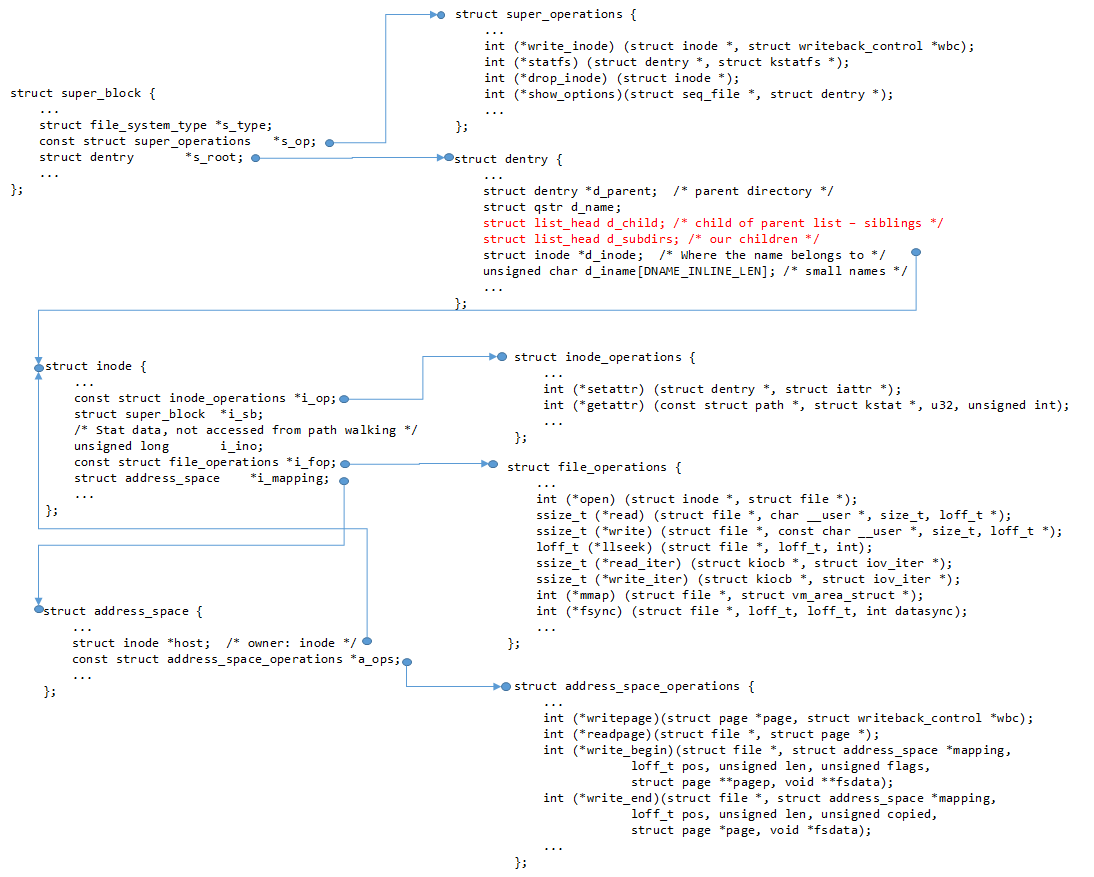
How different data structures are linked together.
Implementation: Define the Filesystem and Its Superblock
Now we can start implementing our filesystem driver. We'll begin from scratch by defining the filesystem type:
static const struct super_operations rf_sops = {
    .statfs      = simple_statfs,
    .drop_inode  = generic_delete_inode,
    .evict_inode = rf_evict
};

static int rf_fill_super(struct super_block *sb, void *data, int silent)
{
    sb->s_op = &rf_sops;
    sb->s_magic = RAMFSC_MAGIC;
    sb->s_time_gran = 1;

    struct inode *root;
    root = rf_make_inode(sb, S_IFDIR | 0755);
    if (!root)
        return -ENOMEM;
    root->i_op = &rf_dir_iops;

    sb->s_root = d_make_root(root);
    if (!sb->s_root)
        return -ENOMEM;

    return 0;
}

static struct dentry *rf_mount(struct file_system_type *t,
                               int flags, const char *dev, void *data)
{
    return mount_nodev(t, flags, data, rf_fill_super);
}

static struct file_system_type rf_fs_type = {
    .owner   = THIS_MODULE,
    .name    = "myramfs",
    .mount   = rf_mount,
    .kill_sb = kill_litter_super,
};

static int __init rf_init(void)  { return register_filesystem(&rf_fs_type); }
static void __exit rf_exit(void) { unregister_filesystem(&rf_fs_type); }
The VFS provides register_filesystem and unregister_filesystem for registering and deregistering a filesystem. Both accept a file_system_type structure defining the owner, the driver name (remember this — we'll use it when mounting), and function pointers invoked during mount and unmount.
rf_mount is called during mounting and delegates to mount_nodev, which initializes the superblock and calls rf_fill_super. That function completes the superblock initialization and attaches the root directory.
How to Operate Under root?
root is a directory, so we need to define how to look up files, create files, and create subdirectories. All of this is specified in rf_dir_iops:
static const struct inode_operations rf_dir_iops = {
    .lookup = simple_lookup,
    .create = rf_create,
    .setattr = rf_setattr,
    .mkdir = rf_mkdir,
};
Four operations:
lookup— default VFS function to resolve names to dentries.create— creates regular files.setattr— called internally by VFS to set inode attributes.mkdir— creates directories.
rf_create
static int rf_create(struct mnt_idmap *idmap, struct inode *dir,
                     struct dentry *dentry, umode_t mode, bool excl)
{
    struct inode *ino = rf_make_inode(dir->i_sb, S_IFREG | mode);
    struct rbuf  *rb;

    if (!ino)
        return -ENOMEM;

    rb = kzalloc(sizeof(*rb), GFP_KERNEL);
    if (!rb || rf_reserve(rb, PAGE_SIZE)) {
        iput(ino);
        kfree(rb);
        return -ENOMEM;
    }
    ino->i_private = rb;

    d_add(dentry, ino);
    return 0;
}
Steps: allocate an inode, allocate an in-memory buffer (rbuf), link the inode to the dentry via d_add. The buffer type is simple:
struct rbuf {
    char  *data;
    size_t size;  // bytes used
    size_t cap;   // bytes allocated
};
rf_mkdir
static int rf_mkdir(struct mnt_idmap *idmap, struct inode *dir,
                    struct dentry *dentry, umode_t mode)
{
    struct inode *inode = rf_make_inode(dir->i_sb, S_IFDIR | mode);
    if (!inode)
        return -ENOMEM;

    inode_inc_link_count(dir);
    inode_inc_link_count(inode);

    inode->i_op  = &rf_dir_iops;
    inode->i_fop = &simple_dir_operations;

    d_add(dentry, inode);
    return 0;
}
The two inode_inc_link_count calls mirror UNIX hard link semantics:
inode_inc_link_count(inode)— accounts for the"."self-reference.inode_inc_link_count(dir)— accounts for the".."back-reference in the new directory.
How Are Inodes Allocated?
rf_make_inode is a thin wrapper around the kernel's new_inode:
static struct inode *rf_make_inode(struct super_block *sb, umode_t mode)
{
    struct inode *inode = new_inode(sb);
    if (!inode)
        return NULL;

    inode_init_owner(&nop_mnt_idmap, inode, NULL, mode);

    if (S_ISDIR(mode)) {
        inode->i_op  = &simple_dir_inode_operations;
        inode->i_fop = &simple_dir_operations;
    } else {
        inode->i_fop = &rf_fops;
        inode->i_mapping->a_ops = &empty_aops;
    }
    return inode;
}
For regular files, empty_aops disables page-level caching — there is no backing store since everything lives in memory.
File Operations
static const struct file_operations rf_fops = {
    .open    = rf_open,
    .read    = rf_read,
    .write   = rf_write,
    .llseek  = generic_file_llseek,
    .fsync   = rf_fsync,
};
rf_open
Attaches the inode's buffer to the file's private data for fast access in subsequent calls:
static int rf_open(struct inode *inode, struct file *filp)
{
    filp->private_data = inode->i_private;
    return 0;
}
rf_read
Copies data from our in-memory buffer to user space using a kernel helper that handles offset tracking and boundary checking:
static ssize_t rf_read(struct file *f, char __user *buf,
                       size_t len, loff_t *ppos)
{
    struct rbuf *rb = f->private_data;
    return simple_read_from_buffer(buf, len, ppos, rb->data, rb->size);
}
rf_write
static ssize_t rf_write(struct file *f, const char __user *buf,
                        size_t len, loff_t *ppos)
{
    struct rbuf *rb = f->private_data;

    if (f->f_flags & O_APPEND)
        *ppos = rb->size;

    loff_t end = *ppos + len;

    if (end > INT_MAX)
        return -EFBIG;
    if (rf_reserve(rb, end))
        return -ENOMEM;
    if (copy_from_user(rb->data + *ppos, buf, len))
        return -EFAULT;

    *ppos += len;
    rb->size = max_t(size_t, rb->size, end);
    i_size_write(file_inode(f), rb->size);
    return len;
}
rf_fsync
Since this is an in-memory filesystem, there is nothing to flush to disk. We still need to handle the call — for example, vim issues fsync on every save:
static int rf_fsync(struct file *file, loff_t start, loff_t end, int datasync)
{
    return 0;
}
Further Reading
- Linux kernel labs: Filesystem Management
- Linux kernel labs: Filesystem drivers (Part 1)
- Creating Linux virtual filesystems — older but clear introductory guide.
- The Linux Kernel Module Programming Guide
- The Linux Kernel by Andries Brouwer
- Diagrams source